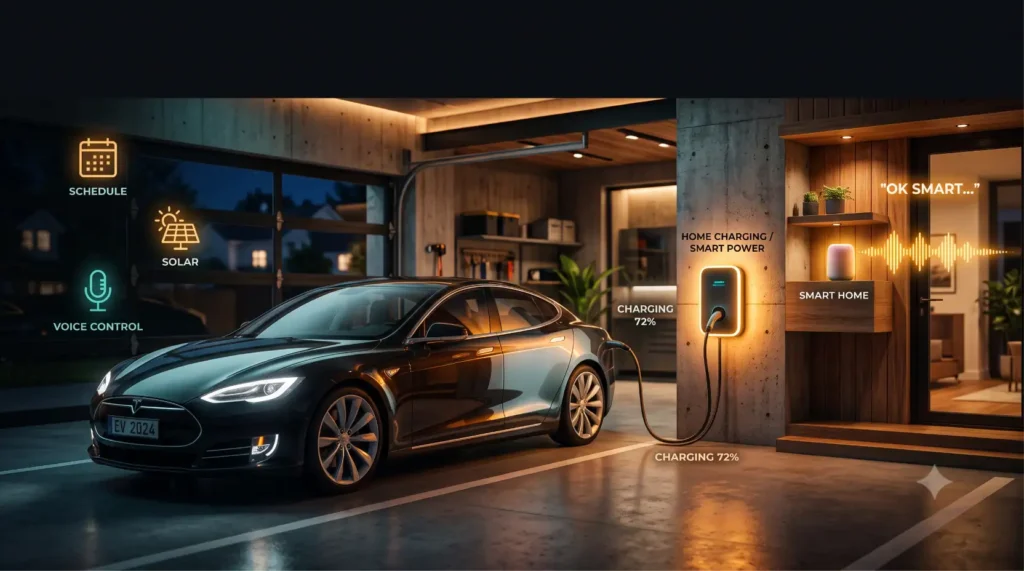
Picture this: you’re standing in the kitchen with your hands full of groceries, and you suddenly remember you never started charging the car. 🙄
Old you would trudge out to the garage, find the charger app, wait for it to load, and tap “start.” New you just says, “Hey Google, start charging the car,” and keeps unpacking the bags. The garage hums to life. Done.
That’s not a gimmick from a tech demo. It’s a genuinely useful, increasingly normal part of living with an electric car in 2026 — and it gets better the deeper you go.
This is the whole promise of an EV charging Alexa smart home setup: your car becomes just another device your home already knows how to talk to. 👇
⚡ The Short Answer
If you want the gist before the deep dive, here it is:
- 🗣️ Voice control works — with the right smart charger linked to Alexa or Google, you can start, stop, and check charging by voice.
- 🤖 Automations do the real magic — routines can charge off-peak automatically, kick in when solar is producing, or pause during peak hours.
- 🔌 It needs a compatible charger or smart plug — not every charger connects, so compatibility is the first thing to check.
- 🏠 Home Assistant unlocks power-user control — for deeper, local, fully customizable automations beyond what Alexa/Google offer out of the box.
The big idea: a smart home doesn’t just let you yell at your charger for fun. It quietly handles when and how your car charges so you save money and never think about it. 😎
🔄 What You Can Automate (At a Glance)
Before we dig in, here’s the menu of things a connected setup can actually do. Capabilities vary by charger and platform, but this is the realistic landscape. ⚡
| What You Want | How It Works | Typical Trigger | Worth It? |
|---|---|---|---|
| 🗣️ Voice start/stop | Charger linked to Alexa/Google | “Start/stop charging” | ✅ Handy daily |
| ⏰ Scheduled charging | Charger app or hub routine | Set time window | ✅✅ Big savings |
| 🔋 Status check | Voice query to assistant | “Is the car charging?” | ✅ Quick peace of mind |
| 🌙 Off-peak automation | Routine + utility schedule | Clock + price window | ✅✅ Best for the bill |
| ☀️ Solar-triggered charge | Hub + solar/energy sensor | Surplus solar detected | ✅ Great if you have panels |
| 🔔 Notifications & alerts | App/hub push messages | Charge done, fault, unplug | ✅ Prevents surprises |
Look at that list. The voice stuff is fun, but the automations — off-peak, solar, scheduling — are where the real value (and money) lives. 🎯
🏠 What Smart-Home EV Charging Integration Actually Does
Let’s start at the foundation, because “smart home integration” gets thrown around loosely.
At its core, an EV charging Alexa smart home setup connects your charging hardware to a central brain — Amazon Alexa, Google Home, Apple Home, or Home Assistant. Once connected, your charger stops being an island and becomes part of your home’s ecosystem.
That connection unlocks three things: voice control (talk to it), automation (it acts on triggers), and visibility (you can see and get alerted about its status). 🧠
Think of your assistant as a translator. You speak a simple command, and it relays a precise instruction to your charger — or, more powerfully, your home does it for you based on rules you set once.
The key word there is “compatible.” Integration only works if your charger (or the smart plug it’s on) can actually talk to your hub. We’ll cover compatibility in detail below — it’s the make-or-break step.
🗣️ Voice Control With Alexa & Google
This is the part everyone wants to try first, so let’s get it right. 🎙️
When a compatible smart charger is linked to Alexa or Google Home, you can generally do three core things by voice: start charging, stop charging, and check status. The exact phrasing depends on how the charger’s integration is named in your app, but the experience is wonderfully simple.
▶️ Start charging. Say something like “start charging the car” and the charger begins delivering power — assuming the car’s plugged in. Perfect for those hands-full kitchen moments.
⏹️ Stop charging. “Stop charging the car” pauses or ends the session. Useful if you suddenly need to unplug, or you’ve hit the cost you wanted.
🔍 Check status. Ask “is the car charging?” or “what’s the charging status?” and your assistant reports back. No walking to the garage, no opening an app.
One honest caveat: voice features depend entirely on what your specific charger’s integration supports. Some expose full control; others only offer on/off via a smart plug. Always check what your charger actually enables before assuming. 📋
💡 Picking hardware? Our roundup of the Best Smart EV Chargers With App Control flags which models play nicest with voice assistants.
🤖 Automations & Routines: Where the Money Hides
Voice control is the showy part. Automations are the part that actually pays your setup back. 💰
A routine is a rule your home follows automatically — no command needed. And the single most valuable one for EV owners is dead simple: charge during cheap off-peak hours, automatically.
Here’s the rhythm that works beautifully:
- 🅿️ You get home and plug in immediately — zero thinking.
- ⏰ Your routine holds charging through expensive peak and evening hours.
- 🌙 When the off-peak window opens (often overnight), charging quietly begins.
- ☀️ You wake up to a full battery, charged at the lowest rate of the day.
You can build this two ways: through your charger’s own app schedule, or through a hub routine (Alexa Routines, Google Home automations) that triggers a smart plug or charger at the right time. Either way, set it once, plug in daily, save automatically. 🎯
You can layer in more: pause charging if the home’s drawing too much power, send a “charging started” ping, or only charge on weekdays. Routines turn a dumb wall box into a money-smart appliance.
💡 This pairs perfectly with utility pricing — see Time-of-Use Charging: How to Automate Cheap Power to find your cheapest window first.
🧠 Home Assistant for Power Users
If Alexa and Google are the friendly front door, Home Assistant is the workshop in the back. 🔧
Home Assistant is free, open-source smart-home software you run yourself (often on a small Raspberry Pi or mini-PC). It’s more work to set up — but it gives you control that off-the-shelf assistants simply can’t match.
Why power users love it for EVs:
- 🔒 Local control. Automations run on your own hardware, not someone’s cloud — faster and more private, and they keep working if the internet drops.
- 🧩 Deep integrations. It can pull in your charger, your car’s battery level, live electricity prices, solar production, and home energy use — then act on all of it together.
- ⚙️ Unlimited custom logic. “Charge only if the battery is below 60%, electricity is under a price threshold, and solar is producing” — that kind of multi-condition rule is its bread and butter.
The trade-off is honest: Home Assistant has a learning curve. You’ll tinker, read forums, and occasionally swear at a YAML file. 😅 But for those who want their EV charging Alexa smart home to be genuinely smart — not just voice-activated — it’s the most capable option out there. You can even keep using voice on top of it.
🔌 Pairing a Smart Charger With Your Hub (Compatibility)
Here’s the step that quietly decides whether any of this works: compatibility. Get it right up front and everything else is easy. 🧩
Not every EV charger connects to every smart home platform. Before you buy — or before you plan automations — check three things:
1. Does the charger support your hub? 🔗 Look on the charger’s spec sheet or app for “Works with Alexa,” “Works with Google,” or Home Assistant support. If it’s listed, integration is usually a few taps. If it’s not, voice control may not be possible directly.
2. Is it Wi-Fi connected? 📶 Smart features need connectivity. A charger has to be online (Wi-Fi, sometimes Ethernet) to talk to a cloud assistant. A purely “dumb” charger won’t integrate at all.
3. Is there a smart-plug workaround? 🔌 For lower-power Level 1 / portable chargers, a heavy-duty smart plug can add basic on/off voice and schedule control — even if the charger itself isn’t “smart.” (Important: only use a smart plug rated for the charger’s full current; EV charging is a serious continuous load, not a phone charger.)
⚠️ One safety note: never improvise with an underrated plug or extension. EV charging runs high current for hours — use only properly rated, charger-grade hardware.
💡 Compatibility varies a lot by model. Our Best Smart EV Chargers With App Control guide breaks down which chargers connect to which platforms.
☀️ Solar-Triggered Charging Via Smart Home
This is the one that makes solar owners grin. 😏
If you have rooftop panels, a smart home can charge your car with your own surplus sunshine — automatically, when the sun’s actually producing. Instead of exporting cheap solar back to the grid, you store it in your car’s battery for free driving.
How it works in practice:
- 📊 An energy sensor (or your solar inverter’s data) tells your hub how much surplus solar you’re generating.
- ⚡ When surplus crosses a threshold, an automation starts charging.
- 🌥️ When a cloud rolls in and surplus drops, it pauses — so you’re not pulling expensive grid power.
This “solar-following” or “surplus-only” charging is one of the most advanced — and rewarding — automations in the EV charging Alexa smart home world. It’s typically easiest with Home Assistant or a charger that has native solar-matching, since it needs live energy data to make smart decisions.
The payoff: in sunny months, a chunk of your driving can come from electricity you generated yourself, at essentially zero marginal cost. 🌞 For anyone with panels, it’s the holy grail of cheap miles.
🔔 Notifications & Alerts
A smart setup isn’t just about commanding your charger — it’s about your charger telling you things. 📲
Good notifications quietly prevent the small annoyances that add up over months. Depending on your charger app and hub, you can get alerts like:
- ✅ “Charging complete” — so you know the car’s ready without checking.
- 🔌 “Charging interrupted / car unplugged” — catch a knocked-loose cable before morning.
- ⚠️ “Fault detected” — get a heads-up if something’s off with the charger.
- 💸 “Off-peak session started” — confirmation your cheap-hours routine fired correctly.
These can land as phone push notifications, or even as spoken announcements through your smart speakers (“The car has finished charging” 🔊). With Home Assistant, you can get truly custom — text yourself only if charging didn’t start by a certain time, for example.
The value here is peace of mind. You stop wondering “did it actually charge?” because your home tells you. And catching a failed charge at 11pm beats discovering an empty battery at 7am. 😬
🇮🇳 India: Smart Home + EV Context
India deserves its own section, because the setup looks a little different here — and it’s growing fast. 🇮🇳
The good news: Alexa and Google Home are both widely available and popular in Indian homes, and smart plugs are cheap and everywhere. So the building blocks of an EV charging Alexa smart home are very accessible — often more affordable than in the US.
A few India-specific realities worth knowing:
- 🔌 Smart-plug control is common. Many EV and e-scooter owners use a properly rated smart plug for voice and scheduled control, since natively “smart” Wi-Fi chargers are still rolling out. (Again — use a plug rated for the actual load.)
- ⚡ ToD tariffs are arriving. As Time-of-Day metering spreads across DISCOMs, automating overnight charging gets genuinely valuable — a routine that charges in the cheap window can meaningfully cut your bill.
- ☀️ Solar + EV is a natural fit. With strong rooftop solar adoption, solar-triggered charging via a smart hub is a compelling option for Indian homeowners chasing near-free miles.
Pricing-wise, a basic voice setup can start under ₹1,500–₹3,000 for a good smart plug, while a fully smart Wi-Fi charger sits higher — comparable to the $200–$700 smart charger range US buyers see. Start small with a smart plug, then upgrade as native-smart chargers become more common locally. 🛠️
📈 2026: Deeper Smart-Home EV Integration
The whole space is maturing fast — and 2026 leans hard toward your home and car working as one system. 🚀
Standards are converging. The Matter smart-home standard is making devices play nicer together across Alexa, Google, and Apple — which should mean less “does this charger work with my hub?” friction over time. 🔗
Chargers are getting smarter natively. More wall boxes now ship with built-in scheduling, solar-matching, and price-aware charging — so you need less external glue to get advanced behavior.
Energy management is going whole-home. The trend is toward your house balancing EV charging, solar, home battery, and appliances together — shifting the car’s charging around everything else automatically. 🏠
Voice is getting more conversational. As assistants improve, natural requests like “make sure the car’s ready by 8am” become more realistic than rigid command phrases.
The throughline: the gap between “I plug in and hope” and “my home optimizes charging automatically” keeps widening. Integration is shifting from a fun extra to a genuine money-and-convenience advantage. 🎯
✅ 5 Tips for Smart-Home Charging
- Check compatibility before you buy. 🔗 Confirm your charger (or planned smart plug) works with your hub first — it’s the step that makes or breaks everything.
- Automate the boring stuff. 🤖 Don’t stop at voice. Set an off-peak routine so charging always lands in the cheap window without you lifting a finger.
- Use a properly rated smart plug — never a generic one. ⚠️ EV charging is high, continuous current. Only use hardware rated for the full load. Safety first, always.
- Turn on notifications. 🔔 A “charging complete” or “charging failed” alert saves you from a dead battery at 7am. Enable them on day one.
- Start simple, then go deep. 🪨 Begin with voice + a schedule. When you’re comfortable, graduate to Home Assistant or solar-triggered charging for next-level control.
🛒 Shop This Post
Here’s the gear that turns “plug in and hope” into a hands-free, voice-controlled charging setup. 😍
1. A Smart Wi-Fi EV Charger 🧠
The cornerstone. Links to Alexa/Google for voice control, schedules off-peak charging, and often supports solar-matching. Look for “Works with Alexa/Google” on the box.
👉 Shop smart Wi-Fi EV chargers
2. A Heavy-Duty Smart Plug (charger-rated) 🔌
The budget on-ramp to voice and scheduled control for portable/Level 1 chargers. Only buy one rated for your charger’s full current.
👉 Shop charger-rated smart plugs
3. A Smart Home Hub 🏠
A central brain (Echo, Nest, or a Home Assistant device) ties your charger, schedules, and routines together for real automation.
👉 Shop smart home hubs
🛍️ Disclosure: These are affiliate picks — they cost you nothing extra, and they help support EVs Mirror so we can keep testing gear and writing honest, no-hype guides. 🙏
🎯 Quick Quiz: Is Your Charging Smart-Home Ready?
Answer these three and you’ll know in about ten seconds. ⏱️
- Is your charger (or its plug) Wi-Fi connected? 🅐 Yes 🅑 Nope, it’s basic
- Have you set up any charging automation? 🅐 Yes, it runs itself 🅑 I start it manually
- Do you get notified when charging finishes or fails? 🅐 Yep 🅑 I just guess
Mostly 🅐: 🎉 You’re living the smart-home dream — your charging is hands-free and optimized.
Mostly 🅑: 🚨 You’re leaving convenience (and likely savings) on the table. A smart plug or charger plus one off-peak routine changes everything. Start today.
📋 Smart-Home Charging Checklist
Run through this to get your setup dialed in:
- [ ] Confirm your charger works with Alexa, Google, or Home Assistant
- [ ] Get the charger (or a rated smart plug) connected to Wi-Fi
- [ ] Link it to your smart home app/hub
- [ ] Test voice control: start, stop, check status
- [ ] Build an off-peak charging routine
- [ ] (Optional) Set up solar-triggered charging if you have panels ☀️
- [ ] Turn on “charging complete” and “fault” notifications 🔔
- [ ] Re-check the schedule each season for shifted rate windows 📅
🤔 People Also Ask
Q: Can I charge my EV with an Alexa smart home setup?
A: Yes — with a compatible smart charger (or a properly rated smart plug) linked to Alexa, an EV charging Alexa smart home setup lets you start, stop, and check charging by voice. The deeper value comes from automations: routines that charge during cheap off-peak hours or when your solar is producing, all hands-free.
Q: Does my EV charger need to be “smart” to work with Google Home?
A: Generally yes. To integrate with Google Home or Alexa, the charger needs Wi-Fi connectivity and stated support for that platform. If your charger isn’t smart, a heavy-duty, properly rated smart plug can add basic on/off and scheduling — just never use an underrated plug for EV charging.
Q: What can I actually automate with smart-home EV charging?
A: The most valuable automations are off-peak scheduling (charge when power is cheapest), solar-triggered charging (charge with surplus panel output), status checks, and notifications when charging finishes or fails. Voice start/stop is handy too, but the time- and solar-based routines are where the real savings live.
Q: Is Home Assistant better than Alexa for EV charging?
A: For power users, often yes. Home Assistant runs locally, integrates deeply with chargers, car battery data, live energy prices, and solar — enabling complex, multi-condition automations Alexa/Google can’t easily do. The trade-off is a steeper setup. Many people use Home Assistant for logic and keep voice on top.
Q: Can a smart home charge my EV using solar power automatically?
A: Yes. With an energy sensor or solar inverter data feeding your hub, an automation can start charging when you have surplus solar and pause when it drops. This “solar-following” charging is easiest with Home Assistant or a charger that natively supports solar-matching, and it can deliver near-free miles.
Q: How much does a smart-home EV charging setup cost?
A: It varies widely. A basic voice setup using a rated smart plug can start around $30–$80 (₹1,500–₹3,000), while a fully smart Wi-Fi EV charger typically runs $200–$700 (₹15,000+). A separate hub is optional if you already own an Echo or Nest device. Start small and upgrade as needed.
🚀 The Bottom Line
After all the talk of routines, hubs, and solar sensors, an EV charging Alexa smart home setup comes down to one satisfying idea: your car becomes just another smart device your home knows how to handle. 🎯
You don’t have to babysit an app or trudge to the garage. You can start charging with your voice, let a routine slot it into the cheapest hours, charge with your own solar when the sun’s out, and get a friendly ping when it’s done. The convenience is instant — and the savings stack up quietly every month.
So do the two things that actually unlock it: check compatibility (the make-or-break step) and build one off-peak routine to start. Then add solar triggers and Home Assistant later if you catch the bug. 🛠️
Plug in tonight, say the magic words, and let your home do the rest. ⚡
💬 What’s your smart-home charging setup — Alexa, Google, or Home Assistant? Tell us in the comments!
📤 Know an EV owner still charging the manual way? Share this and upgrade their garage. 🙏
🔖 Bookmark EVs Mirror for honest, money-smart EV guides.
👉 Next reads: Best Smart EV Chargers With App Control and Time-of-Use Charging: How to Automate Cheap Power.